

Youtube Gallery: Themes
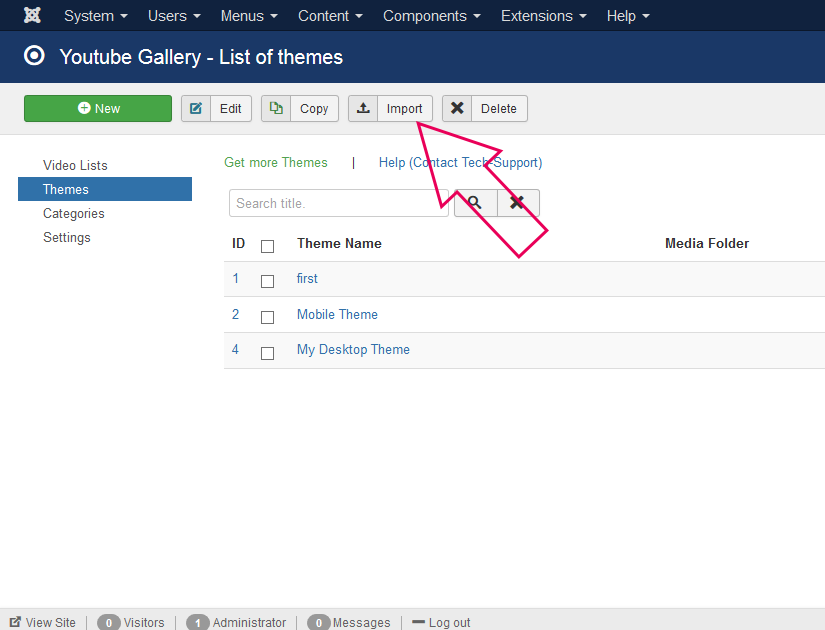
To install a theme to your Joomla website, please go to "Components/Youtube Gallery"
And click on the "Import" button in Toolbar
In Youtube Gallery PRO you can edit the theme with no limitation.
In Youtube Gallery Free you can install theme and use it as it is.
|
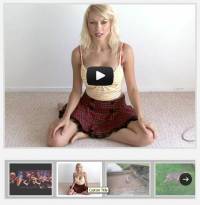
A theme with cool jquery/css thumbnail scroller plugin. It works by cursor movement or next/previous buttons. Uses: jQuery thumbnail scroller Plugin from: http://manos.malihu.gr/jquery-thumbnail-scroller Price: Free |

|
Gallery with one column. 100% responsive. Adjust player width and height to fit into your design. Navigation section height can be adjusted in "Custom Layout box". Colors can be adjusted in "Custom Navigation Bar Layout" box. To change thumbnail size use "Thumbnail CSS Style" box. Price: Free |

|
This theme is a copy of the Simple Grid, but it includes the code to trigger a clean popup of the video using the JCE MediaBox plugin. This is so you don't have to install another plugin just to get a litebox effect. You can edit the width and height of the video in the custom layout box. Only for Youtube Videos
Requirements: Please note: Helix Advanced Settings must be off. (if you have Helix installed) Price: Free |